The Undead 3D PSD Text Effect: A Designer's Gateway to Gothic Typography
In the visual landscape of gaming and digital media, typography is not merely about conveying words; it's about evoking atmosphere, emotion, and identity. A font can whisper a tale of mystery or scream a challenge. For creators seeking to imbue their projects with a visceral, haunting aesthetic, the Undead 3D PSD Text Effect for Gaming emerges as a powerful and efficient tool. This graphic resource transcends being a simple font file. It is a pre-constructed, high-quality text effect style packaged within a Photoshop document, offering a streamlined path to professional-grade design.
Deconstructing the Digital Resource: What Exactly is This PSD Effect?
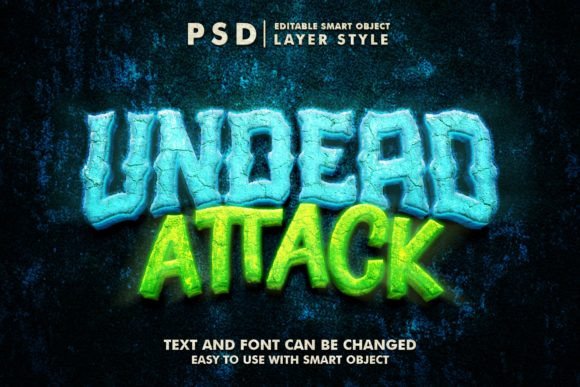
At its core, this asset is a meticulously crafted Photoshop file. The term "PSD" refers to Photoshop's native document format, which preserves layers, effects, and editing capabilities. The "Undead" aspect defines the stylistic theme—a grungy, eroded, often blood-spattered or spectral three-dimensional typeface that feels pulled from a dark fantasy or horror game. The 3D Psd Text Effect is not a flat image; it is a multi-layered composition where shadows, highlights, textures, and depth are already applied, simulating a three-dimensional extrusion. The advertised 2000x1333px resolution at 300 dpi ensures the output is suitable for both high-resolution print and detailed digital displays, providing flexibility from web banners to physical posters.
The Engine of Ease: Smart Objects and Organized Layers
The most significant technical advantage lies in the use of Smart Objects. Within the provided PSD file, the editable text is contained within a Smart Object layer named "Your Text." This functions as an embedded, self-contained document. To edit the text, a user simply double-clicks this layer. Photoshop opens the Smart Object in a new tab, where the underlying text can be replaced with any custom wording. After saving this internal file, the changes automatically propagate back to the main PSD, instantly updating the entire complex Undead 3d effect with the new text. This process eliminates the need to manually reapply shadows, bevels, or textures—the effect is dynamically linked to the text content. Complementing this, the well-organized layers and 100% editable structure mean that if a designer wishes to tweak the color of the blood splatter or the intensity of the shadow, they can dive into the layer stack and make adjustments, offering both simplicity for beginners and depth for experts.
Practical Applications Beyond the Gaming Sphere
While born from gaming aesthetics, the utility of such a resource is remarkably broad. Its real-world relevance spans numerous creative and commercial fields.
- Digital Branding & Social Media: Crafting striking YouTube channel art, Facebook covers, or Twitter headers that immediately communicate a dark, edgy, or powerful brand identity.
- Promotional Materials: Designing attention-grabbing banner promotions, email headers, or website hero elements that stand out in a crowded digital space.
- Print & Merchandise: Applying the effect to poster designs, flyers for events like horror conventions, or even T-shirt and clothing graphics. The high-resolution file supports this transition to physical products.
- Content Creation & Illustration: Using the text as a key component in digital illustrations, game stream overlays, podcast logos, or as titles for indie film projects and cartoons.
- Professional Presentations: Enhancing logo presentations or mood boards for clients in industries like entertainment, alternative fashion, or themed entertainment.
The provided 1 Image file alongside the PSD serves as a quick reference or a ready-to-use asset for situations where editing is not required, further extending its convenience.
Characteristics and Advantages for the Modern Creator
The value proposition of this specific text effect style centers on several key characteristics. First is time efficiency. Recreating a comparable 3D undead text effect from scratch requires expertise in layer styles, texture sourcing, and lighting effects—a process that can consume hours. This resource compresses that workflow into minutes. Second is quality assurance. The effect provides a professionally rendered starting point, ensuring a polished look that might be difficult for a novice to achieve independently. Third is consistency. For a project needing multiple titles or logos in the same style, using the same PSD template guarantees visual coherence.
It is crucial, however, to consider the tool's context. It is not a standalone font that can be typed in any software; it is a Photoshop-dependent asset. This means users must have access to Adobe Photoshop (or a compatible application that supports PSDs and Smart Objects) to leverage its full editable features. The aesthetic is also highly theme-specific. While versatile within its niche, the grungy, "undead" look may not suit a corporate, minimalist, or cheerful brand message. Understanding these constraints is part of its practical application.
Integrating the Effect into a Creative Workflow
For a hobbyist designing a stream overlay, the workflow is straightforward: open the file, double-click, insert their channel name, save, and export the needed section. A business owner creating flyers for a Halloween event might replace the text with the event title, then perhaps adjust the layer containing the crimson texture to better match their brand's specific shade of red before sending the file to a printer. An educator teaching a digital media class might use this very PSD as a teaching tool, deconstructing the layer organization to demonstrate how complex typographic effects are built in professional software. Each user interacts with the resource at the level their expertise demands.
Observations in online design communities show that resources like the Undead 3D PSD Text Effect for Gaming are particularly popular among indie game developers, streamers, and small business owners in niche markets. They bridge the gap between ambitious visual goals and often limited budgets or technical skill sets. They empower creators to achieve a high visual standard without requiring a dedicated graphic designer for every single text element. This democratization of design quality is a noteworthy trend in the digital asset marketplace.
The Bigger Picture: Semantic Value and Creative Empowerment
Ultimately, such resources are more than just downloadable files. They represent a shift towards modular, reusable design components. In an era where content velocity is high, tools that offer quick, easy possibility without sacrificing quality become integral. The Undead text effect exemplifies this, providing a specific solution for a specific aesthetic need. Its usefulness is measured not just in the time saved, but in the confidence it gives a creator to execute a vision that might otherwise seem technically daunting. By allowing the user to focus on their message—their custom text—while the tool handles the complex rendering of style, it aligns perfectly with the principles of helpful content: it solves a problem, educates through its structure, and enables the user to act. Whether the final application is a YouTube cover, a movie title, or a poster design, the effect serves as a gateway, transforming a simple string of words into a compelling piece of Gothic visual storytelling.