Mastering Your Brand Presentation with the Gaming Deck Mockup
A Practical Tool for Modern Creators
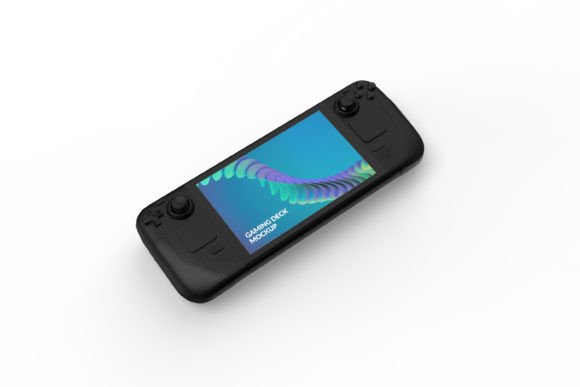
The Gaming Deck Mockup is a digital design asset built for professionals who need to showcase their work in a compelling, realistic context. It is not merely a graphic, but a structured file—typically for software like Adobe Photoshop—that provides a clean and simple framework to present logo designs, brand marks, or other artwork on a stylized gaming device. This mockup moves your design from a flat, abstract concept into a tangible visual scene, allowing clients, stakeholders, or your audience to envision the final application. Its primary role is in the presentation and validation phase of a creative workflow, bridging the gap between initial design creation and final approval or marketing.
Where does it fit into the broader process? Consider the typical journey of a logo design project. After the initial sketches and vector refinement, the designer faces the crucial task of demonstrating how that logo will live in the real world. Static PNGs on a white background fail to convey context, scale, and material interaction. The Gaming Deck Mockup offers a specific, relevant environment—a gaming deck—that immediately suggests a use case: gaming hardware, peripherals, esports branding, or tech-related ventures. By placing your design here, you advance the project from a conceptual stage to a client-facing stage, facilitating better feedback and more informed decision-making.
Integration into Professional Workflows
The utility of the Gaming Deck Mockup extends across various timelines in a project. It can be employed during the design refinement phase to test visual impact, or after the final design is completed to produce marketing materials or pitch decks. For a freelancer or agency, it acts as a final polish step before delivery, enhancing the perceived value of their service. For a small business owner creating their own branding, it becomes a tool to generate professional-looking assets for their website or social media without requiring advanced 3D rendering skills.
This mockup interacts seamlessly with other tools and resources. It is designed to be used within a layered image editing application, relying on your existing design files—the logo artwork you created in Illustrator or Affinity Designer. The mockup itself is the staging ground. Its organized layer structure and use of Smart Objects mean you aren’t working in isolation; you are merging your primary asset with a pre-built, high-quality scene. This interoperability is key. It saves you from sourcing stock photography, manually masking, or painstakingly creating shadows and lighting effects, thereby connecting your core creative toolset with efficient presentation output.
Core Features for Streamlined Execution
The advertised features of the Gaming Deck Mockup—easy background color change, Smart Objects for logo placement, organized layers, and RGB color mode—are specifically engineered for practical implementation. Let’s break down how each translates into a smoother workflow.
- Easy to Change Background Color: This allows you to adapt the mockup’s ambiance to match your brand’s color scheme or the mood of a particular presentation. A dark background might convey premium sophistication, while a bright one feels energetic. Changing it is typically a matter of modifying a single layer’s fill color, enabling rapid iteration without affecting the core device rendering.
- Smart Objects for Easy Editing: This is the cornerstone of the mockup’s usability. You double-click a specific layer, paste your logo design into the opened file, save, and it instantly appears on the gaming deck with correct perspective, scaling, and blending. This non-destructive editing preserves the mockup’s quality and allows for limitless swaps—perfect for comparing different logo versions or presenting a suite of client options.
- Well Organized Layers: A clean layer group structure means you aren’t wasting time hunting for the element you need. Layers for the device, shadows, highlights, background, and logo placeholder are logically named and grouped. This organization supports quick editing and is essential for maintaining efficiency, especially when working under time constraints or when handing the file off to a colleague.
- RGB Colors: The file is optimized for digital use—websites, social media, digital portfolios, online pitches. RGB ensures the colors you see are vibrant and appropriate for screen display, which is the primary destination for this type of visual asset.
Practical Implementation and Workflow Tips
To integrate the Gaming Deck Mockup smoothly into your routine, start with preparation. Ensure your logo design is finalized as a high-resolution PNG or PSD file with a transparent background. Having this asset ready streamlines the Smart Object replacement process. Before you even open the mockup, consider the story you want the image to tell. Is it for a startup pitch deck? Then maybe use a bold, solid background color. Is it for a website showcasing your design portfolio? Perhaps a subtle, neutral background works best to keep focus on the logo itself.
When executing, follow a simple process: open the mockup file, locate the Smart Object layer designated for the logo (often labeled "Your Logo Here" or "Placeholder"), and double-click it. Insert your logo design, center it appropriately within that Smart Object file, and close/save it. Next, adjust the background color layer to your preference. Finally, examine the composite image. Check that the logo sits naturally on the device—the mockup’s lighting and shadows should integrate with your design automatically, but it’s good practice to ensure no odd contrasts exist. Export the final image in the required format and resolution for its intended use.
A useful observation is that this mockup promotes consistency. If you are presenting a series of logos for different gaming-related projects, using the same Gaming Deck Mockup frame for each creates a cohesive, professional portfolio layout. It becomes a standardized template for your brand presentation work, enhancing quality control across multiple client deliverables or internal projects.
Beyond Logo Placement: Creative Applications
While the primary use is for logo designs, the Smart Object functionality opens other doors. You could place other artwork here—a patterned texture, a key brand illustration, or even a text-based slogan—to visualize how it would appear on a product. This flexibility allows marketers and educators to create hypothetical scenarios or training materials. For example, an educator teaching branding principles could use the mockup to quickly demonstrate how different design choices look in application. A blogger reviewing gaming hardware could use it to create custom visuals for their articles.
The long-term use value of a well-made mockup like this is high. Once you understand its layer structure, it becomes a reusable asset in your toolkit. You can return to it for future projects, saving the cost and time of finding a new solution. Its simplicity is its strength; it doesn’t require constant updates or complex software compatibility. It works as a static, reliable tool that you can deploy whenever the need arises to present a design on a gaming device.
Factors for Effective Use: Usability and Efficiency
Successful use hinges on a few factors. Compatibility is foremost: ensure you have access to image editing software that supports PSD files and Smart Objects (like Photoshop or similar applications). Usability is built into the mockup’s design, but your own familiarity with layer-based editing will determine how quickly you can operate. If you’re new to such software, spending a few minutes exploring the layer panel of the mockup file before editing is a worthwhile preparation step.
For maximum efficiency, consider creating a batch workflow. If you have ten logo concepts to present, you can open the mockup, replace the Smart Object with the first logo, export, then simply double-click the Smart Object again and replace it with the second logo. The organized layers make this repetitive task straightforward. This batch approach is invaluable for freelancers and studios handling multiple iterations.
Finally, consider the outcome. Using the Gaming Deck Mockup is about achieving a specific outcome: a persuasive, realistic visual that advances a project decision or enhances marketing communication. It turns a design file into a presentation-ready artifact. By integrating this tool into your workflow at the right moment—after design creation but before final delivery or publication—you add a layer of professionalism and context that can significantly improve feedback clarity, client satisfaction, and the overall impact of your creative work.
In essence, the Gaming Deck Mockup is a bridge. It connects the abstract world of pure design with the concrete world of product application. For professionals across fields—designers, marketers, entrepreneurs, and content creators—it provides a simple, controlled, and highly effective method to visualize and validate branding decisions, ensuring that the final logo doesn’t just look good in isolation, but looks perfect in place.